As a publisher or creator, there’s nothing worse than creating great content, driving traffic to brands, and still not earning the revenue you expect. Unfortunately, non-monetized clicks, traffic that doesn’t result in a commission, are a common occurrence in the affiliate world.
There are many reasons a click might fail to monetize, but the primary causes include:
- Click origin: Merchants may only pay for traffic from certain locations.
- Device type: Merchants may place a higher value on certain types of traffic (e.g., mobile versus desktop).
- Commission changes: Merchants may eliminate payments on certain product categories or otherwise change their commission rules without notice.
- Unapproved merchants: A creator or publisher may accidentally drive traffic to a merchant they aren’t approved to work with — or merchants that don’t offer affiliate commissions at all.
Reporting capabilities in the Sovrn Commerce platform include a non-monetized clicks report to help you identify these clicks, understand their root cause, and take steps to prevent them.
And now, we’re helping to prevent non-monetized clicks before they happen with our new price comparison pages feature.
Introducing Price Comparison Pages
When this feature is enabled, a price comparison module is automatically generated any time it detects a non-monetized click. Instead of driving clicks directly to the unmonetized merchant, your audience will see a comparison page showing alternate ways to buy the product, giving them additional purchase options.
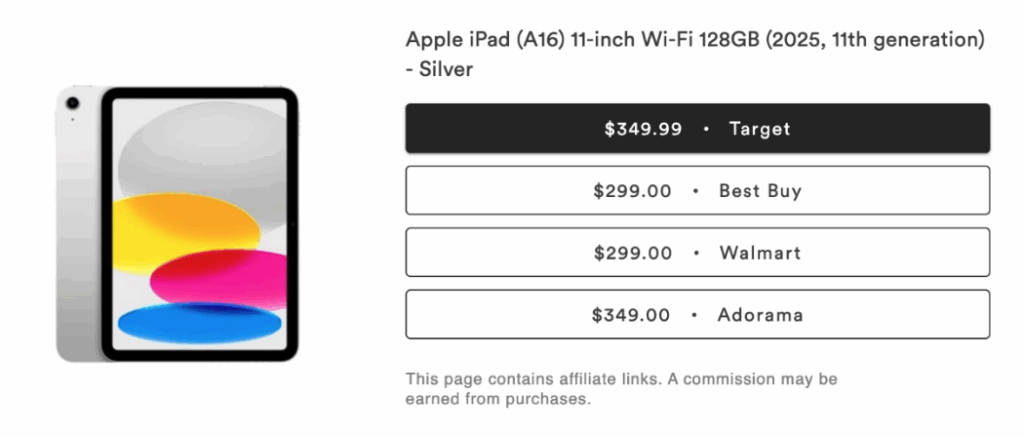
The original merchant is always shown first, so there’s no confusion. If the reader clicks on a Target link, they’ll still see Target as the first buying option. The price comparison page simply gives them more options for purchasing the same product, which typically improves conversions.
Product listings are automatically updated in real time, so price comparison modules will always show current prices and product availability for each merchant. You can get more details on price comparison pages for non-monetized Clicks in this Knowledge Base article.
Elevate the Shopping Experience with Price Comparison Pages
In today’s world, most shoppers already know what they’re looking for, so it’s important to streamline the comparison-shopping process as much as possible. Sovrn’s price comparison tools put the best deals at your audience’s fingertips, giving them a convenient way to buy the products they want at the best price, while also increasing clicks and driving conversions.
The new price comparison pages tool is one of many convenient options for building and publishing price comparisons in Sovrn Commerce. We also offer customizable templates in the Sovrn Commerce platform, an easy-to-use Commerce Product API, and automated price comparisons designed to scale with your content.
Interested in Trying out Price Comparison Pages to Prevent Non-Monetized Clicks?
Price comparison pages for non-monetized clicks are available to all Sovrn Commerce users. Setup is simple — there’s no coding required, and we’ll handle everything for you.
If you’re interested in trying it out, contact our support team and request activation of price comparison pages for non-monetized clicks. The support team will confirm once the feature has been enabled for your account. Once active, Sovrn will automatically generate price comparison pages any time an unmonetized click is detected.